



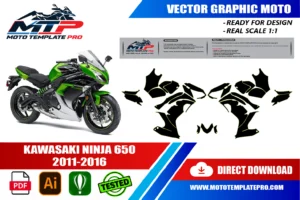
This Kawasaki Ninja 650 2011-2016 vector template reproduces the Kawasaki Ninja 650 2011-2016 at real scale (1:1) as an editable vector file.
Table of Contents
Kawasaki Ninja 650 2011-2016 Vector Template: Overview
Use this Kawasaki Ninja 650 2011-2016 vector template as an accurate base for decal kits, vinyl wraps, custom liveries and other graphics on the Kawasaki Ninja 650 2011-2016. It is made for graphic designers, wrap installers and sticker manufacturers.
The Kawasaki Ninja 650 2011-2016 template is made for the faired middleweight twin that so many riders use every single day: to the office on Monday, onto a winding road on Sunday. It is light, approachable and inexpensive to run, and its compact bodywork suits graphics that look sporty without trying too hard.
That everyday character is exactly what makes it interesting for decals. Owners of a Kawasaki Ninja 650 2011-2016 usually want a livery that feels right in town traffic, in the rain and in a car park, not only on a sunny track. The fairing is simple enough for one bold idea and large enough for a proper stripe, a name or a number.
These editable vector outlines give you the real shape of the body panels at 1:1, with layers grouped by part, so you can plan seams and colour breaks on true geometry. They are a starting point for your own artwork, not a finished design ready to print.

The template is provided as an editable vector file, compatible with Adobe Illustrator, PDF and CorelDRAW. It is a starting point for your own design work rather than a finished, ready-to-print graphic: a precise outline of the panels that you can use to position decals, plan a wrap layout or prepare a sticker kit at the correct scale. For background on why vector files are the standard for wrap and decal production, see the Adobe comparison of raster and vector formats.
Naming and generations of the Kawasaki Ninja 650 2011-2016, from ER-6f to Ninja 650
The faired twin began in 2006 as the ER-6f, the fairing version of the ER-6n naked bike, and in some markets it was sold as the Ninja 650R. The engine is a 649 cc parallel twin, and that size stayed the same through the years this template covers. A restyle arrived in 2009 with new bodywork, mirrors, instruments and lighting.
The key date for a designer is 2012. Sources describe all-new bodywork that year, together with a two-piece seat, wider handlebars and a new tachometer above an LCD display. The R was dropped from the US name and the bike became simply the Ninja 650, while in Europe and other markets it kept selling as the ER-6f. The Kawasaki Ninja 650 2011-2016 listing therefore covers more than one name.
For 2016, reports describe only cosmetic changes: new colour schemes, fuel tank pinstripes, contrast-coloured rear shocks and wheel stripes, with no change to the engine. The next big step came in 2017 with a new trellis frame and sharper styling, which is why this range ends at 2016.
We did not verify what differs between each model year from 2013 to 2015, so check those on the actual bike. The range follows the template listing: the sources we found place the new bodywork in 2012, so compare a 2011 motorcycle closely before relying on the Kawasaki Ninja 650 2011-2016 outlines.
Body panels of the Kawasaki Ninja 650 2011-2016, panel by panel
The Ninja 650 is a fully faired bike with a compact shape, so the list of parts is short. The upper fairing, or nose, carries the headlight and the screen. The side fairings run along the flanks, and a lower section closes the underside around the exhaust. How these pieces are divided can differ from one bike to another, so check your own motorcycle before you rely on a layer name.
Behind the rider, the seat unit ends in the tail with small side covers, and plastic trim covers part of the fuel tank area. The front fender and the rear hugger are separate parts that carry matching stripes well. Mirrors, indicators and the edge of the screen interrupt the surface, so plan lines around them rather than through them.
Parts that carry a commuter-sport design
- Nose: the face of the bike, good for a small number or a colour block.
- Side fairings: the main canvas for a long, flowing stripe.
- Lower section: a contrast colour here makes the bike look lower and planted.
- Tail and hugger: small areas where a repeated motif works better than detail.
Layers are grouped by part, so you can hide everything except one panel and check your artwork without distraction. Photograph each real panel against a wall with a ruler, and compare it with the Kawasaki Ninja 650 2011-2016 outline before you cut anything.
Commuter-sport livery ideas for the Kawasaki Ninja 650 2011-2016
A commuter-sport bike deserves a livery that works at 30 km/h as well as at 130. On the Kawasaki Ninja 650 2011-2016, think of one confident line instead of many small shapes: a stripe that starts low on the nose, climbs along the side fairing and fades out toward the tail. It reads as quick even when the bike is parked outside an office.
Two-tone schemes with a fine contrast line look more expensive than busy graphics. Reports for 2016 list green with black, red with black and a single grey as factory colours, so a quiet owner-made alternative could be graphite with a thin accent in a colour you like. Avoid copying factory schemes or brand shapes; invent your own.
Daily riders also benefit from visibility. A narrow reflective strip on the lower fairing and the tail is almost invisible by day and bright under headlights at night. Keep it small and symmetrical so it looks designed rather than added.
If the bike is a first big bike, a matte base with a few gloss details is forgiving: it hides the small scratches of car parks and city life. Test a swatch in daylight, because green and red shift a lot between screen and vinyl.
From outline to cut file: working the Kawasaki Ninja 650 2011-2016 template
Open the file at 100 percent and print the nose and one side fairing on paper. Hold them against the bike and check the outline with a ruler. The vector outlines are drawn at 1:1, so the paper should match the panel within your printer’s tolerance. If it does not, check the print scale first, then look for aftermarket or repaired parts.
Keep the original contours on locked layers and build the artwork above them. Add a bleed of a few millimetres wherever the film wraps around an edge, and leave a safe margin for any text or number that must stay readable. Convert text to outlines, add registration marks outside the artwork and put the cut path on its own spot-colour layer.
Before sending anything to the plotter, think about the roll. Large side fairings may need to be split at a natural seam, and small pieces can be nested to save film. Name every piece by panel and side, such as left side fairing, so you never cut the same side twice.
Plot a small test piece first, weed it and transfer it to the bike with application tape. It shows whether your cut depth, speed and blade are right. Save a master file with untouched contours, a working file with the artwork and a production file with only print and cut layers, so a client’s change on their Kawasaki Ninja 650 2011-2016 never forces you to start again.
Weatherproof vinyl for a daily rider: the Kawasaki Ninja 650 2011-2016 in rain, sun and car washes
A bike that is ridden every day meets rain, road salt, bird droppings, fuel splashes and long hours in direct sun. Cast vinyl with a clear laminate is the safer choice for the curved parts of the nose and side fairings, because it follows curves and stays flatter than cheaper film. Use the same laminate on every panel so gloss and colour stay uniform.
Preparation decides how long the work lasts. Clean with isopropyl alcohol, remove wax, polish and chain lube, and repair cracks or loose paint first, because vinyl shows every flaw underneath. Fit in a warm, clean room out of direct sun. Start from the centre of each piece, push air outward with a felt squeegee and use heat only lightly on curves.
Give the adhesive a day or two before washing the bike. Later, hand-wash with a soft sponge. If you use a pressure washer, keep it at a distance and never aim it at an edge. Take extra care near the exhaust and the lower fairing, where heat is stronger, and ask your supplier for a film suited to that temperature.
Wrap edges around the panel where the shape allows, so air cannot lift them at speed. On the Kawasaki Ninja 650 2011-2016, edges facing the wind and the lower edges near the road spray are the ones to watch.
Six small errors that spoil a graphic on the Kawasaki Ninja 650 2011-2016
The most common error on a daily rider is designing from photographs instead of the real bike. Panels get scratched, replaced or swapped for aftermarket versions, and an outline from a catalogue picture can end up a few millimetres out. Measure first.
- Ending a stripe exactly on a panel edge where wind and rain can lift it.
- Ignoring the mirrors, indicators and screen edge that interrupt the surface.
- Applying film over cracked, waxed or chalky plastic.
- Choosing thin film that creases over the compound curves of the nose.
- Mirroring a graphic blindly, when the exhaust and small parts make the two sides differ.
- Cutting the whole kit before testing one piece on the bike.
Another mistake is overloading a small bike. A middleweight twin like this looks best with a clear idea, two or three colours and strong contrast. Too many shapes look busy at traffic-light distance.
Finally, do not assume every year is identical. The 2012 redesign changed the bodywork, and we did not verify differences between 2013 and 2015, so confirm the details on your Kawasaki Ninja 650 2011-2016 before ordering vinyl.
Choosing the right Kawasaki Ninja 650 2011-2016 template: year, name and variant
Start with the name on the bike, but do not stop there. The same twin appears as ER-6f in Europe and other markets and as Ninja 650 elsewhere, and older US bikes carried the 650R name. The year matters more than the badge: the bodywork was redesigned for 2012, and a 2017 or later Ninja 650 has a new frame and sharper styling, so those later bikes are outside this range.
If your bike is a 2011 model, compare it closely. The sources we found place the new bodywork in 2012, which suggests a 2011 bike has the earlier shape, but the range follows the shop listing and we cannot confirm every detail. Hold a printed nose and side fairing against the bike before you commit.
The naked ER-6n is a different motorcycle without the fairing, so a faired template does not apply to it. Also check the panels: crash repairs, aftermarket screens, belly pans or tail pieces can change an outline. We do not claim the Kawasaki Ninja 650 2011-2016 template fits every variant, since fit can vary with exact variant, year and aftermarket parts.
Write a short checklist with photographs from the front, side and rear, and keep it with your order. It helps you, your printer and your client agree on what is being built.
How This Template Is Built
This Kawasaki Ninja 650 2011-2016 vector template is rebuilt as a fully editable vector outline from the real panel proportions of the Kawasaki Ninja 650 2011-2016, rather than a rough tracing or a stretched photo. Working at true 1:1 scale means printers and installers can output panels straight from the file without rescaling, which keeps stripes, sponsor logos and pinstripes aligned exactly where they were designed.
Because the panel outlines are kept as separate, editable shapes, you can turn individual sections on or off while you design and export only the panels you actually need for production. On a vehicle of this kind (sport bike), the typical panel groups include the tank cover, fairings, side panels and tail section. Before printing, always measure a panel on the real vehicle against the file, since small production differences can happen and a quick check avoids a costly reprint.
What You Can Use This Template For
- Full or partial vinyl wrap layouts
- Decal and sticker kits
- Custom liveries
- Tank and fairing graphics
- Sponsor logo and branding placement
This Kawasaki Ninja 650 2011-2016 vector template suits riders planning a full wrap or a partial decal kit, wrap shops quoting jobs sight-unseen, and sticker manufacturers who need a reliable base file instead of starting from photographs. Because the panel outlines are separated rather than merged into one flattened shape, you can isolate a single panel and export only what you need, which saves time when a project only touches part of the vehicle.

Files Included and How to Use Them
After purchase you get an instant digital download of the Kawasaki Ninja 650 2011-2016 vector template in three formats. A typical workflow takes only a few steps:
- Download the file from your account or order email right after payment.
- Open the AI, PDF or CorelDRAW version in your vector software.
- Hide the panels you do not need and place your graphics, logos and colors on the rest.
- Print one test panel at 1:1 and check it against the real vehicle.
- Export the final artwork for your printer or cutter.
Printing, Scale and File Notes
Before you print this Kawasaki Ninja 650 2011-2016 vector template, remember that it is built at real 1:1 scale, so the safest workflow is to print a single test panel first and lay it against the actual Kawasaki Ninja 650 2011-2016 before committing to a full print run. A short test print is cheap insurance against a wasted roll of vinyl, especially around curved sections.
The vector layers are grouped by panel, which keeps the file manageable if you only need a subset of the panels, useful for a partial wrap, a single panel graphic or a small decal pack. If you run into a fitment question that is not covered here, reach out before you print. We would rather answer a quick question in advance than have you reprint a panel.
Also in our catalog: Kawasaki NINJA 400 2018-2023 Vector Template, Kawasaki ZX10R 2011-2015 Vector Template, Kawasaki ZX-10R Race Bodywork 2016-2020 Vector Template, Kawasaki Ninja ZX-6R 636 2013-2018 Vector Template, Kawasaki Ninja ZX-6R 636 2019-2023 Vector Template, Kawasaki Ninja ZX-6R 2019-2023 Vector Template.
Browse all Kawasaki vector templates.
Moto Template Pro is an independent design resource and is not affiliated with, endorsed by, or sponsored by Kawasaki or any manufacturer.
Which model years does this Kawasaki Ninja 650 2011-2016 vector template cover?
This template is built specifically for the Kawasaki Ninja 650 2011-2016.
How can I tell if my Kawasaki Ninja 650 2011-2016 has the 2012-style bodywork?
Compare the nose, side fairings and tail with photographs of the redesigned bike, and look at the two-piece seat and the instrument layout, which sources link to the 2012 update. We did not verify every detail between model years, so the safest check is a printed template held against the real panels.
Will a graphic on the Kawasaki Ninja 650 2011-2016 survive daily rain and car washes?
It can, if you use cast vinyl with a clear laminate, clean the plastic properly and wrap edges where the shape allows. Wait a day or two before the first wash, hand-wash gently and keep a pressure washer away from edges. Strong sun and heat near the exhaust are the main long-term enemies.
What livery keeps a Kawasaki Ninja 650 2011-2016 sporty without drawing attention in town?
A single sweeping stripe in a tone close to the base colour, with one thin contrast line, looks sporty and calm. Add a small reflective strip on the lower fairing for night visibility. Keep text small and avoid loud sponsor-style shapes if the bike is parked outside every day.
Is the Kawasaki Ninja 650 2011-2016 template suitable for a 2017 or newer Ninja 650?
Not as a rule. Sources describe a new frame and sharper styling from 2017, so the body panels differ. We do not claim compatibility with later bikes. Compare the real panels with the outlines at 1:1, or ask the shop with photographs before ordering.
Is the Kawasaki Ninja 650 2011-2016 template an official Kawasaki drawing?
No. It is an independent vector template made for decal and wrap designers, not an official, approved or OEM file. You get editable AI, PDF and CorelDRAW outlines at 1:1 scale, with layers grouped by part, as a starting point for your own artwork.
Is this template compatible with other models?
No. Each model and generation has different bodywork, so this template is specific to this platform and differs from every other template in our catalog.
What file formats are included?
The template is provided in Adobe Illustrator, PDF and CorelDRAW, all as editable vector layers rather than a flattened image.
How is the file delivered?
As an instant digital download available immediately after purchase, with no physical items shipped and no waiting on a production schedule.
Is this an official Kawasaki product?
No. Moto Template Pro is an independent business, not affiliated with Kawasaki.

Kawasaki Ninja 400 2018-2023 Vector Template
Kawasaki Versys 650 2008 Vector Template
Kawasaki Z800 2013-2016 Vector Template
Kawasaki ZX-10R Race Bodywork 2016-2020 Vector Template


Reviews
There are no reviews yet.